Claude Cowork is Anthropic's autonomous AI workspace for non-technical professionals. At $20/month, it connects to 1,800+ business apps and runs recurring tasks on a schedule — no prompting required. In our live workshop, we demonstrated three automations: inbox triage with CRM and calendar updates, conference prospect research with personalized email drafts, and expense reconciliation with automatic QuickBooks updates. Key features: Projects, Scheduled Tasks, Skills, Connectors, Plugins, and Artifacts.
What Is Claude Cowork?
Claude Cowork is Anthropic's AI workspace designed to automate repetitive business tasks for non-technical professionals. It gives business owners, managers, and teams the ability to set up intelligent, autonomous workflows that connect across their existing tools: Gmail, Slack, HubSpot, QuickBooks, Google Calendar, and 1,800+ other apps and run on a recurring schedule without requiring manual prompting every time.
According to our research, 62% of office workers spend their time on repetitive tasks that can be automated by AI. Claude Cowork was built specifically to close that gap for everyday professionals; no coding required. It is built on the same infrastructure as Claude Code (Anthropic's developer-facing autonomous agent), but designed for people who build businesses, not software.
Claude Cowork vs. Claude Chat: What's the Difference?
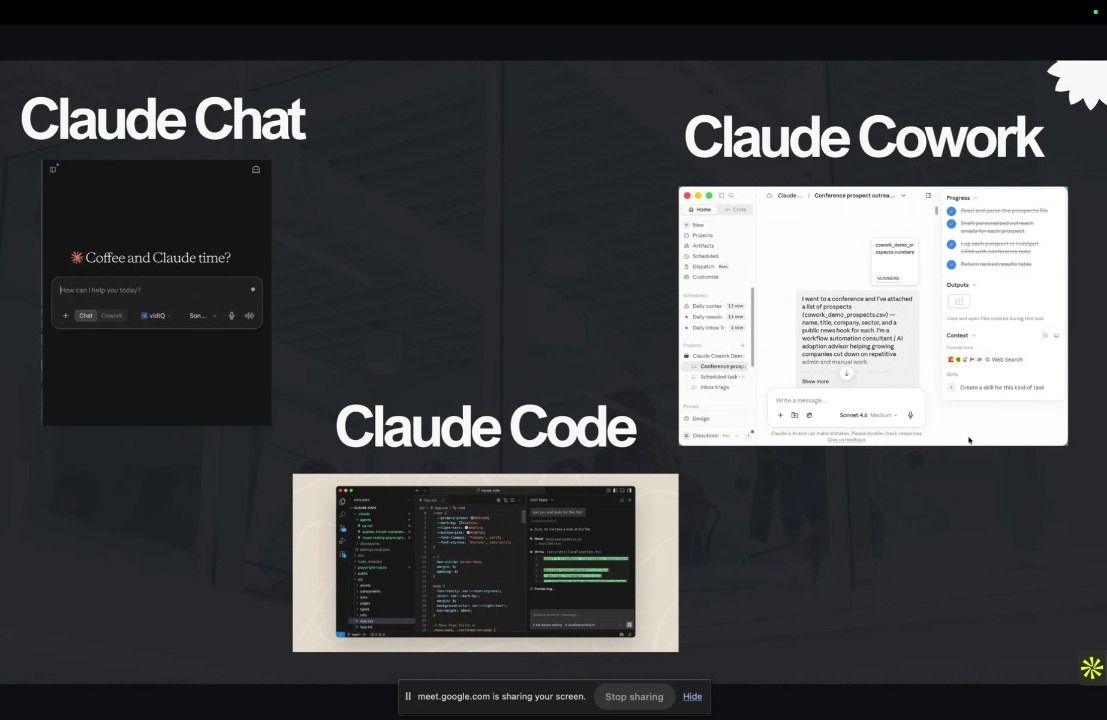
Most people are familiar with AI chatbots: you type a prompt, you get a response. Claude Chat works this way: it is turn-by-turn and human-in-the-loop at every step. Claude Cowork operates differently.
Claude Chat is best for one-off questions and ad hoc help. You initiate every interaction. Claude Cowork is built for ongoing, repeatable business processes. You give Claude a goal once, connect your tools, and it executes, including automatically on a schedule you set.
"With Claude Chat, you are still kind of a human in the loop in every single sort of interaction. With Claude Cowork, it's autonomous, I can give Claude Cowork a task and it's going to go do it for me. I don't have to go back and forth with it." — Olasubomi, The Product Builders
The key differentiator is scheduled automation. Claude Cowork lets you set a task to run every morning at 9 am, every Monday, or any custom schedule, and it executes without you needing to trigger it. This is what converts AI from a productivity aid into a genuine business system.
How Much Does Claude Cowork Cost?
Claude Cowork is included with Anthropic's Claude Pro subscription at $20/month. Go to claude.ai, sign up for Pro, and both the Chat and Cowork tabs appear automatically. Claude Cowork is available on the Claude desktop app and on the web; the web version was recently launched, making it accessible from any browser without installing software.
A Tour of the Claude Cowork Interface
Projects
Projects are isolated workspaces each with its own memory, context, and instructions. Have one project for marketing, one for client management, one for finance. Claude keeps them completely separate, which produces significantly better results than mixing everything together.
Instructions
Instructions are persistent rules Claude follows for every session within a project: your preferred tone, output formats, custom company terminology (e.g., "refer to QuickBooks as QBO"), or specific workflows to follow. They act like an onboarding document Claude reads before every task.
Scheduled Tasks
Scheduled Tasks are the biggest time saver in Claude Cowork. Set any workflow to run automatically at any time and day. Configure it once and Claude executes it on its own, connecting to your tools, doing the work, and notifying you of the results. No manual trigger. No copy-paste. No re-prompting.
Skills
Skills are reusable, saved workflows you trigger on demand with a slash command (e.g., /expense reports skill). You can create them by asking Claude, writing instructions manually, or by saying after a completed task: "Based on this interaction, create a skill for me."
Connectors
Connectors are integrations that let Claude take real actions inside your existing tools. Claude Cowork supports 1,800+ connectors including Gmail, Google Calendar, Slack, HubSpot, Salesforce, Clay, QuickBooks, Notion, and more. You can add custom connectors via an MCP (Model Context Protocol) server URL. This is what makes Claude Cowork genuinely powerful; Claude isn't just drafting text, it's taking actions across your entire stack.
Plugins
Plugins are pre-packaged bundles of skills and connectors built for team deployment. A plugin can be installed once and shared across a whole organization; HR, legal, operations, and sales teams all get pre-configured AI workflows tailored to their function, without each person building from scratch.
Artifacts
Artifacts are shareable interactive outputs Claude creates: dashboards, visual summaries, live reports. Share an artifact via link and any team member can interact with it without needing access to your Claude account.
3 Real-World Claude Cowork Automations (From Our Live Workshop)
The following automations were demonstrated live during the Claude Cowork 101 workshop. Each one shows what a real business workflow looks like when built on Claude Cowork.
Automation 1: Inbox Triage, Lead Management, and Calendar, all on Autopilot
The problem: After a busy week or conference, emails pile up, leads go untracked, and follow-ups get missed. Manually sorting the inbox takes hours.
What we built: Claude Cowork was connected to Gmail, Google Calendar, Slack, and a CRM. Running automatically every day at 1pm, it categorizes every email into three buckets (must respond, need a decision, can ignore), drafts replies saved to Gmail Drafts, logs new leads to the CRM after one-time approval, fires a Slack notification to the team with an audit-trail label, creates Google Calendar events for meeting requests, and updates a shared artifact dashboard the whole team can see. All of this with zero daily manual input.
"Every morning, it runs this and looks through my inbox. It tells me things I could ignore, and things I need to respond to it's saved me hours every week." — Olasubomi, TheProductBuilders
Automation 2: Conference Prospect Research and Personalized Outreach
The problem: After a conference, you have a list of names and companies but no time to research each person, find contact info, and write personalized outreach.
What we built: With only a name and company as input, Claude used the Clay connector to enrich each contact, pulling professional background, role, challenges, and email addresses. It then prioritized the top 3 prospects based on fit with TheProductBuilders' offerings and drafted a personalized outreach email for each one. All drafts were saved to Gmail for review, leads were logged in the CRM, and the team was notified on Slack. The emails read naturally, not templated.
Automation 3: Conference Expense Reconciliation and QuickBooks Update
The problem: Processing conference receipts, categorizing expenses, and updating QuickBooks manually is slow and error-prone one of the most tedious admin tasks for small business owners.
What we built (requires Claude Desktop): Receipt images were uploaded to a folder. Claude accessed the file system with permission, processed every receipt, created a categorized CSV with flagged items, then, after approval, logged all expenses directly into QuickBooks with accurate categories and amounts. It also generated a shareable artifact for the bookkeeper. The entire workflow was saved as a reusable skill. Claude automatically spawned 6 sub-agents to handle parallel validation, a built-in behavior requiring no configuration.
"This could have taken me hours, depending on the volume of receipts. And this was automatically cleared within a matter of minutes." — Olasubomi, The Product Builders
How to Get Started with Claude Cowork in 5 Steps
Step 1: Get a Claude Pro subscription. Go to claude.ai and subscribe for $20/month. The Cowork tab appears automatically.
Step 2: Create your first project. Pick a repetitive task you handle every week. Create a dedicated project for it with a clear name (e.g., "Weekly Lead Management").
Step 3: Set the context and instructions. Add background about your company and preferences. Write instructions for tone, formats, and any custom terminology Claude should follow.
Step 4: Connect your tools. In the Customize menu, add Connectors for the apps involved in your workflow. Start with two or three: Gmail, Slack, and your CRM or accounting tool.
Step 5: Run your first workflow and save it as a skill. Describe what you want done. Once Claude delivers results you're happy with, say: "Based on this interaction, create a skill for me." Then schedule it to run automatically.
Claude Cowork Web vs. Claude Desktop: Which Should You Use?
Both run the same model and support connectors, skills, scheduled tasks, and artifacts. The one difference is local file system access. Claude Desktop can read, create, and update files on your computer required for workflows like receipt processing or local document handling. For everything else inbox management, CRM automation, calendar, Slack, the web version works perfectly. And Claude Desktop always asks for explicit permission before touching any file.
Final Thoughts
Claude Cowork is not just another AI tool to add to your stack. It is a genuine shift in how you can structure your business. Instead of prompting an AI every time you need help, you set up a system once and let it run. The inbox triage happens. The leads get logged. The receipts get reconciled. And you did not have to touch any of it.
The three things that make Claude Cowork different are scheduled autonomy, multi-tool connectivity, and reusable skills. Build the workflow once and it runs forever. If 62% of your work time goes to repetitive tasks that follow the same pattern every week, the only real question is how fast you can get the first one running.
Once you have the basics down, there is a lot more you can do with it. We put together a guide on 5 Claude Cowork hacks almost nobody uses that will help you get significantly more out of the tool right away.
Want to see all three automations built live from scratch? Watch the full Claude Cowork 101 workshop recording on YouTube. It is free, it is practical, and you can follow along at your own pace.
And if you want to bring this to your whole organization, or you are hitting the limits of what Claude Cowork can handle on its own, that is exactly what we help with. We train teams on how to use AI effectively in their day-to-day work, and we build more robust agentic workflows for businesses that need something beyond what Claude Cowork offers out of the box. Reach out to us and let us figure out what the right solution looks like for your team.
Frequently Asked Questions
What is Claude Cowork?
Claude Cowork is Anthropic's AI workspace designed to automate repetitive business tasks for non-technical professionals. It connects to 1,800+ business apps and can run recurring workflows on a schedule — without needing a human to trigger each run.
What is the difference between Claude Chat and Claude Cowork?
Claude Chat is a turn-by-turn assistant — you prompt it and it responds. Claude Cowork is autonomous: you give it a goal, connect your tools, and it executes multi-step workflows on its own, including on a recurring schedule.
How much does Claude Cowork cost?
Claude Cowork is included with Anthropic's Claude Pro subscription at $20/month. Once subscribed at claude.ai, both the Chat and Cowork tabs become available.
Can Claude Cowork send emails automatically?
Claude Cowork saves drafted emails to Gmail Drafts for your review rather than sending them automatically. This keeps a human in the loop for all external communications while still eliminating the manual drafting work.
Does Claude Cowork integrate with QuickBooks?
Yes. Claude Cowork connects to QuickBooks via its connector. It can create and categorize transactions, reconcile expenses, and pull financial reports — as demonstrated in the expense reconciliation workflow in our Claude Cowork 101 workshop.
What is the difference between a Skill and a Connector in Claude Cowork?
A Connector is an integration with an external app (Gmail, Slack, HubSpot, QuickBooks) that gives Claude the ability to act inside that tool. A Skill is a saved, reusable workflow you trigger on demand with a slash command. Skills can combine multiple Connectors.
How do I automate a recurring task in Claude Cowork?
After running a workflow successfully, go to Scheduled Tasks in Claude Cowork, set the recurrence (daily, weekly, custom time), and save it. Claude will execute the task automatically at that time every day without any manual trigger.
What is the difference between Claude Cowork web and Claude Desktop?
Both support the same connectors, skills, and scheduled tasks. Claude Desktop adds the ability to interact with your local file system — reading files, creating spreadsheets, and processing documents stored on your computer.
Is Claude Cowork suitable for non-technical users?
Yes. Claude Cowork requires no coding. You describe what you want in plain language, connect your tools, and Claude handles the execution. It was specifically designed for professionals who want AI automation without needing a developer.
What is a Claude Cowork Plugin?
A Plugin is a pre-packaged bundle of skills and connectors that can be deployed across a whole team or organization. Businesses can work with builders like TheProductBuilders to create custom plugins for specific departments — HR, legal, finance, sales — so employees get pre-configured AI workflows without building them individually.